Salesforce Open CTI is Retiring in Feb 2028. Start planning early with a Free Assessment!

Your Agent's Secret Weapon on Every Call: Claude, Salesforce MCP & Multi-Database Search
Your phone system is already doing its job. Your agents need something more - an AI assistant that can search Salesforce and every other system they rely on, in plain English, while the customer is still on the line.
AICCAASSALESFORCEGENERAL INFORMATION
6/13/20267 min read
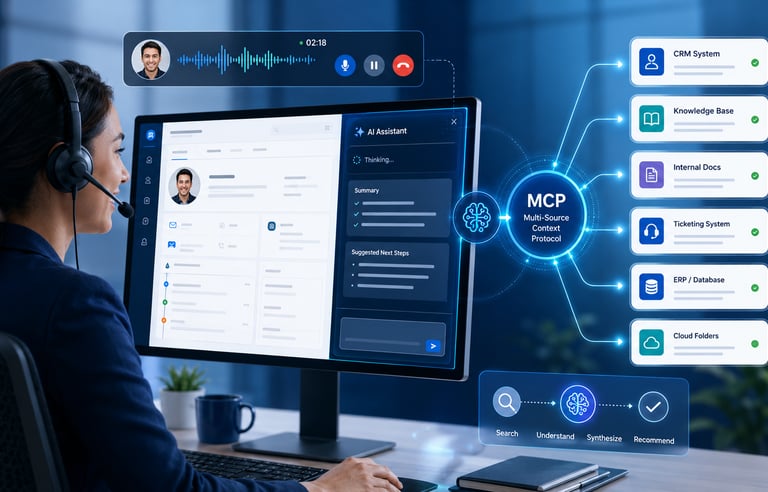
If you've deployed a modern UCaaS or CCaaS platform integrated with Salesforce, your phone system is already doing a lot of the heavy lifting. The call comes in, a screen pop fires, Salesforce gets updated, and if your platform supports it, real-time transcription is running in the background helping guide agents through scripted next steps or flagging sentiment shifts. That's a solid foundation. For most contact centers, that represents years of effort to get right.
But here's the gap that's becoming harder to ignore: the moment a customer asks something your agent doesn't already know, the conversation usually stalls. The agent puts the caller on hold. They open a second browser tab. They ping a colleague in Slack. They dig through a knowledge base that may or may not surface the right thing. All while the clock runs and the customer waits.
What if your agent had a research assistant sitting beside them on every call - one they could ask a question in plain English and get back a synthesized answer in seconds, pulled from Salesforce, your knowledge base, your ERP, your internal docs, or wherever the right information actually lives?
That's the role AI tools like Claude are beginning to play in the contact center. Not as a replacement for your phone system's built-in AI, but as a complementary layer that gives the agent on-demand access to the full breadth of your organization's knowledge - right when they need it most.
Two Layers, One Agent Experience
Before diving into what Claude can do, it's worth being precise about what it doesn't replace; because the two often get conflated in vendor conversations and marketing materials.
Your phone system's AI layer (whether that's built into your CCaaS platform, powered by Google CCAI, or something native to your UCaaS provider) is purpose-built for telephony-adjacent intelligence. It handles things like real-time transcription of the call in progress, sentiment analysis and alerts, scripted agent guidance and compliance prompts, automatic Salesforce record creation and call logging via the phone system's own API integration, and post-call summaries written back to the CRM. These are things your telephony platform does well, and they're deeply integrated with the call control layer in a way a general-purpose AI tool isn't designed to replicate.
Claude operates in a different dimension entirely. It's not listening to the call; it's responding to the agent. Think of it as the agent's own research assistant: available in a side panel or separate workspace, ready to receive a question typed or pasted in, and capable of searching across systems that your phone platform's AI was never designed to touch.
Your phone system's built-in AI and Claude serve different functions , and work best when both are present
Together, these two layers cover the full agent experience. The phone system AI keeps the agent informed about the call itself. Claude keeps the agent informed about everything else your business knows.
The Role of Salesforce Hosted MCP
One of the most practical recent developments for this architecture is Salesforce's Hosted MCP Server, which reached General Availability in April 2026 after a pilot and beta period that started in mid-2025. If you're not familiar with MCP (Model Context Protocol), it's an open standard originally developed by Anthropic that defines how AI tools communicate with external data sources. Think of it as a universal connector: instead of writing custom API integrations between Claude and each of your business systems, MCP-compatible sources simply expose themselves as tools that Claude can query through a standardized interface.
What Salesforce's hosted implementation does specifically is create a managed, Salesforce-run endpoint that exposes your org's data and logic to any MCP-compatible AI client. Claude is MCP-compatible. That means an agent using Claude can ask, in plain English, something like "pull up this customer's last three cases and tell me if any are still open," and Claude will call the Salesforce MCP server, execute the appropriate query against your actual org, and return a synthesized answer, without a developer writing a line of custom integration code.
Why this matters for governance: Salesforce's hosted MCP server isn't just a convenience — it respects your existing security model. User permissions, object-level access, field-level security, and sharing rules all apply. An agent using Claude through the Salesforce MCP connector only sees data their Salesforce profile already allows them to see. Your Salesforce admin controls what's exposed as an MCP tool. That's enterprise-grade governance, not a workaround.
Salesforce's Hosted MCP Server (GA April 2026) lets Claude query your org with no custom API bridge and full governance intact.
But Salesforce is just one source. That's the larger point. Claude's value in the contact center isn't that it can read Salesforce; your phone system already does that. It's value is that it can search Salesforce and your ERP, and your internal knowledge base, and your SharePoint or Google Drive, and your ticketing system, and synthesize all of that into a single coherent answer. Each of those systems can be connected via its own MCP server or standard API. The agent asks one question. Claude goes looking in all the right places.
Why the Phone System Integration Still Matters
It's worth saying plainly: none of what Claude brings to the table replaces the value of a well-integrated phone system. In fact, the two work better when the telephony layer is doing its job well.
When your CCaaS or UCaaS platform is properly integrated with Salesforce, i.e. screen pops firing reliably, call activity logging accurately, real-time transcription running - the agent starts every conversation with baseline context already established. They're not scrambling to pull up the right record or figure out who's calling. That foundation is what allows the agent to make meaningful use of Claude. If the phone system integration is weak or broken, the agent is spending their cognitive bandwidth on basic logistics instead of on the customer conversation itself.
This is a point worth thinking through strategically. As you evaluate AI tools like Claude for your contact center environment, the question isn't just "what can Claude do?", it's "what foundational work needs to be in place to make Claude maximally useful?" The answer almost always starts with a phone system that's well-configured and well-connected to your CRM.
A practical framing: Your phone system's AI handles the call. Claude handles the knowledge. Agents who have both at their fingertips stop putting customers on hold. They stop escalating unnecessarily. They stop saying "I'll have to get back to you." That combination (not either layer in isolation) is what actually changes the agent experience.
Best Practices for Getting This Right
The technology is real and the patterns are emerging quickly. But the organizations that will get the most out of this approach are the ones that treat it as a deliberate strategy rather than a point solution. A few things that matter:
Audit your Salesforce data quality first. Claude searching Salesforce is only valuable if the data it finds is accurate and up to date. Stale records, missing fields, and inconsistent entry habits will surface immediately when an AI is querying your org on behalf of live agents. This is actually a useful forcing function as it exposes data quality issues that have always existed but were easy to ignore.
Decide which systems matter most, then prioritize those MCP connections. You don't need to connect every database on day one. For most sales teams, Salesforce plus a knowledge base or pricing database covers the majority of mid-call research needs. For service teams, Salesforce plus a product knowledge base and policy library often covers the most common scenarios. Start there and expand as you learn what agents are actually asking.
Think about where Claude lives in the agent's workspace. An AI assistant is only useful if it's frictionless to access. Whether Claude surfaces through a browser tab, an integrated side panel, or eventually through native integrations within your CCaaS platform will shape how often agents actually use it. This is a workspace design question as much as a technology question.
Keep human judgment at the center. Claude surfaces information, then the agent decides what to do with it. Positioning Claude as an assistant rather than an authority is both the right framing and the right usage model. Agents should feel empowered by it, not replaced by it.
Leverage your Salesforce admin to define what's exposed. The Salesforce hosted MCP server gives your admin control over which objects and actions are available to Claude. That's a meaningful governance lever. Involve your Salesforce admin early so the configuration reflects your business's actual data access policies, not just the default maximum.
How CommCorrect Technologies Can Help
Getting from vision to reality involves decisions that span your phone system, your Salesforce org, and now your AI tooling, and those decisions interact with each other in ways that aren't always obvious until you're in the middle of implementation.
CommCorrect Technologies helps sales and service contact centers navigate exactly this kind of multi-system strategy. We help you evaluate the right combination of technologies for your specific environment, understand how they fit together, and connect you with the right implementation partners when the technical work begins.
Specifically, we can help you:
Assess your current phone system integration with Salesforce - understanding what's working, what's missing, and what foundation needs to be in place before adding AI tools on top of it
Evaluate CCaaS and UCaaS platforms based on their native AI capabilities, their Salesforce integration depth, and their compatibility with adjacent tools like Claude
Map your agents' most common mid-call research needs to identify which systems Claude should be connected to first and what MCP connectors will drive the fastest value
Think through workspace and adoption strategy - because the best AI tool in the world delivers no ROI if agents don't use it consistently
Plan your Open CTI migration timeline in parallel with any AI tooling decisions, since both conversations are happening in the same strategic window
If you're already thinking about how to layer AI capability onto a contact center environment that uses Salesforce; or if you're in the middle of evaluating phone systems and want to make sure AI readiness is part of the selection criteria, that's exactly the kind of conversation we're built for.
CommCorrect Technologies, LLC
5233 Driscoll Court, Orlando, FL 32812
© 2026 CommCorrect Technologies, LLC. All rights reserved.